Updated June 2nd, 2026. Facebook's incidents feature in the scariest data breaches of all time.
Let's talk about Facebook's security track record. It ain't exactly stellar — and rebranding to "Meta" hasn't changed that. With billions of dollars and tens of thousands of engineers, you'd expect better. Instead, Facebook's history is a recurring loop of breaches, regulatory fines, and carefully worded apologies. Each incident a gut punch to user privacy.
Deleting Facebook might feel like throwing your phone into the ocean because you got a single spam text. So rather than go scorched earth, let's do something more useful: understand what actually happened, and take back as much control as we can. This post covers every major breach from 2005 through 2025, plus the concrete steps you can take today.
TL;DR — Your data has probably been exposed. Here's what to do right now:
- Check haveibeenpwned.com to see if your email or phone number appeared in a breach.
- Enable two-factor authentication on Facebook (authenticator app, not SMS).
- Use a unique password for Facebook that you don't reuse anywhere else.
- Clear your off-Facebook activity history and audit connected apps.
Details on all of the above are in the Protecting Your Data section below.
History of Facebook Security Breaches
Over the last two decades, Facebook has been involved in numerous damaging data breaches and scandals. Below is a full timeline through 2025, along with steps you can take to limit the fallout from future leaks.
2005: MIT Proves a Point by Gathering Data on 70,000 Users
The first known Facebook security violation took place in December 2005, when researchers at MIT wrote a script that downloaded publicly posted user information. Their goal was to demonstrate how much data people were voluntarily exposing on social media. They ended up harvesting personal data on over 70,000 users without consent.
The lesson hasn't changed: anything you post publicly will be collected, whether by researchers, advertisers, or someone with worse intentions.
2013: 6 Million Accounts Breached
In July 2013, a bug in Facebook's platform exposed the personal information of over six million users to unauthorized parties. The flaw was embedded in the contact-download feature — when users downloaded their Friends list data, they also received contact details they weren't authorized to see, including email addresses and phone numbers.
Cybercriminals had been exploiting this vulnerability since 2012, more than a year before Facebook discovered it and pushed a fix.
2014: Cambridge Analytica
Voter-profiling company Cambridge Analytica gained access to the private information of up to 87 million Facebook users without their knowledge or consent. While technically not a software breach, Cambridge Analytica was using the data in direct violation of Facebook's policies — feeding insights into US voter attitudes to the Trump campaign.
Here's how it unfolded: a researcher paid Facebook for access to user data, which was permitted under Facebook's rules at the time. That researcher then passed the data to Cambridge Analytica, which was not permitted. By the time various news outlets broke the full story in 2018, Cambridge Analytica had already acted on the data — and kept much of what it had acquired even after the scheme was exposed.
Government officials on both sides of the Atlantic criticized Facebook for making this possible. Mark Zuckerberg responded by pointing to the platform's data policy, noting that Facebook does not sell user data.
March 2019: Hundreds of Millions of Passwords Stored in Plain Text
In March 2019, cybersecurity journalist Brian Krebs reported that Facebook had been storing between 200 and 600 million user passwords in unencrypted plain text — searchable by more than 20,000 Facebook employees. Internal applications had been logging passwords this way since at least 2012. About 2,000 engineers made roughly nine million internal queries against this data.
Facebook released an official statement: "There is nothing more important to us than protecting people's information, and we will continue making improvements as part of our ongoing security efforts at Facebook."
That sounded promising. Then the rest of 2019 happened.
April 2019: 540 Million Facebook Records on a Public Server
One month later, the Cyber Risk team at UpGuard reported over 540 million records sitting on a publicly accessible server, including account names and Facebook IDs. UpGuard had been trying to notify the Mexican company hosting the server since January — it took until April before the data was finally secured.
September 2019: Another 419 Million Facebook Records on a Public Server
An unknown group's publicly accessible server was found to contain 419 million Facebook records — unique Facebook IDs, phone numbers, gender, and location data. A direct callback to the April incident, right after Facebook had announced it was making improvements.
December 2019: 267 Million Facebook Accounts on the Dark Web
Online watchdogs detected a disturbing Facebook breach in December 2019: over 267 million users had their personal data exposed on the dark web, possibly for up to two weeks. By the time media reported the breach, Facebook claimed to have already patched the vulnerability. In March 2020, another 42 million records surfaced on a different server — gathered by the same criminal organization based in Vietnam.
2021: 533 Million Accounts Scraped and Leaked
Over the weekend of April 3, 2021, a massive dataset containing the personal information of approximately 533 million Facebook users appeared online — names, birthdays, locations, and phone numbers. In the US alone, 30 million accounts were affected.
Facebook acknowledged the leak but said it stemmed from a scraping vulnerability that had been fixed in 2019. That was cold comfort to half a billion people whose data was now circulating freely. You can check whether your information was included at haveibeenpwned.com.
November 2022: Ireland Fines Meta €265 Million for the 2021 Breach
The Irish Data Protection Commission (DPC) — Meta's lead EU regulator under GDPR — fined Meta €265 million (approximately $275 million) for failing to protect users' data in the scraping incident that produced the 533 million-record leak. It was the largest GDPR fine related to a data breach at the time. Meta did not admit wrongdoing.
2023: $725 Million Class-Action Settlement
A class-action lawsuit arising from the Cambridge Analytica scandal resulted in a $725 million settlement — the largest privacy settlement in US history at the time.
- Lawsuit origins: Users alleged that Meta failed to protect their data and enabled unauthorized third-party access.
- Settlement details: Meta agreed to pay $725 million but admitted no wrongdoing. The claims deadline was August 25, 2023.
- Payouts: The settlement received final court approval in October 2023. Over 27 million claims were filed, so individual payouts were small — typically a few dollars to around $30 per claimant after attorney fees (~$180 million) were deducted. Distributions began in late 2023 and early 2024. You can check the status at facebookuserprivacysettlement.com.
The settlement is significant in dollar terms but doesn't erase the underlying privacy concerns. Meta's data practices continued to draw regulatory attention into 2024.
July 2024: Texas Wins $1.4 Billion Over Biometric Data
In July 2024, Meta agreed to pay the state of Texas $1.4 billion — the largest privacy settlement between a US state and any company in history. The lawsuit centered on Meta's "Tag Suggestions" feature, which used facial recognition to identify people in photos without their explicit consent, in violation of Texas's Capture or Use of Biometric Identifier Act. Meta did not admit wrongdoing.
2024–2025: Credential Compilation Leaks
In January 2024, security researchers at Cybernews uncovered a 26-billion-record credential compilation dataset — dubbed the "Mother of All Breaches" (MOAB) — circulating on hacker forums. It included large volumes of Facebook credentials drawn from previously known breaches. In June 2025, a follow-up compilation of roughly 16 billion passwords surfaced, again including Facebook logins.
Neither of these was a new intrusion into Meta's systems. They were aggregations of older breach data. But they're a reminder that credentials from past breaches keep circulating long after the original incident, and that credential stuffing — attackers trying stolen usernames and passwords against other sites — remains an active threat wherever passwords are reused.
The Cost of Facebook's Privacy Failures: Regulatory Fines at a Glance
Incident coverage tells one part of the story. The fines give a clearer picture of consequences:
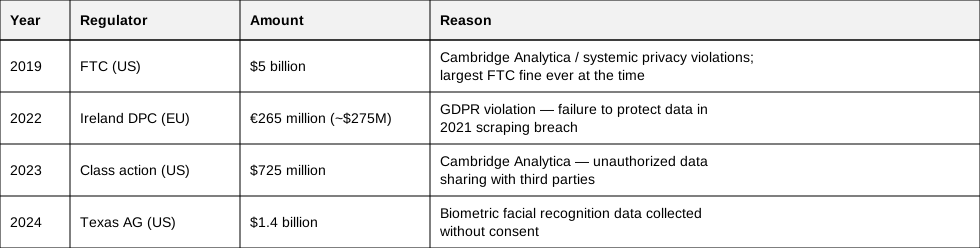
That's over $7.4 billion in fines and settlements in five years, across multiple jurisdictions. The pattern suggests this isn't a series of isolated mistakes.
Protecting Your Personal Data on Facebook and Other Online Sites
Despite its track record, Facebook remains one of the most widely used platforms on the internet. You shouldn't assume it will keep your data safe — because history shows it won't, at least not reliably. What you can control is how much exposure you create, and how much damage a breach can do.
Limit the Damage: Facebook Security Settings Worth Changing
Experts recommend taking the following steps to lock down your Facebook security:
Clear Off-Facebook Activity History — Facebook tracks your activity across the web, even when you're not on Facebook, and uses it to target advertising. To clear it:
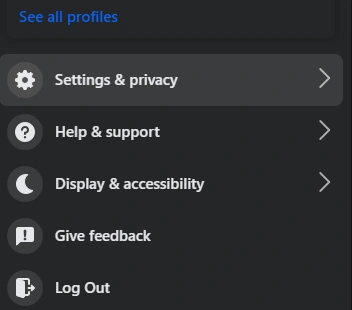
- Select Settings and Privacy from the menu, then Settings
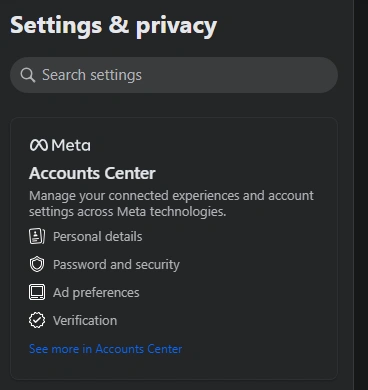
- Click Accounts Center
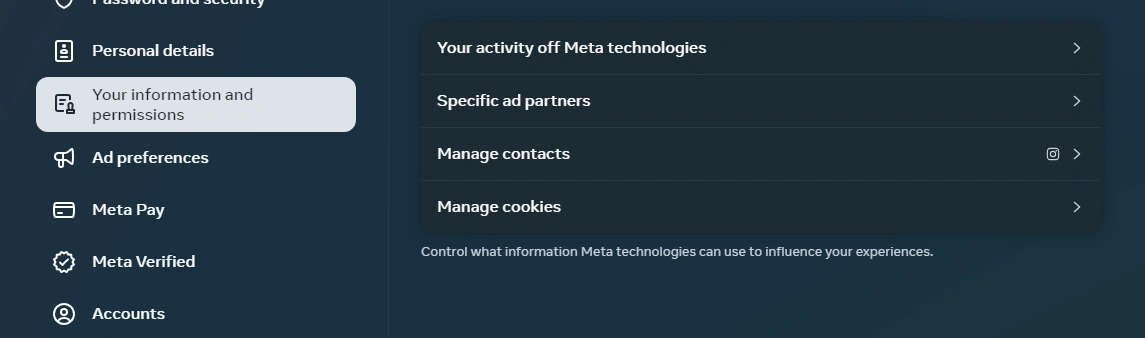
- Select Your information and permissions under Account settings
- Select Your activity off Meta technologies
Here you can clear and disconnect your off-platform activity history.
Disable Third-Party App Tracking — If you've used your Facebook login to sign in to other apps, those apps may be tracking your activity. To audit and disable them:
- Select Settings & Privacy from the menu, then Settings
- Scroll down on the left until you see Your Activity
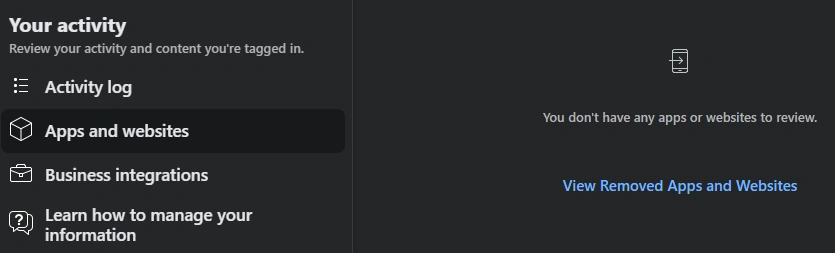
- Click Apps and websites. Under Active, you can disable tracking from individual apps.
Use Two-Factor Authentication — The extra step is worth it. With 2FA enabled, a hacker who gets your password still can't log in without a code sent to your device. To enable it:
- Select Settings and Privacy from the menu, then Settings
- Click Accounts Center
- Under Account settings, choose Password and security
- Choose Two-factor authentication under Login and recovery
Use an authenticator app rather than SMS. SMS-based 2FA can be intercepted through a SIM-Swap Attack. If you're not sure which authenticator app to use, our guide to the best authenticator apps covers the main options.
Limit Who Can See Your Posts — Set your account to private, and restrict who can see sensitive posts beyond that:
- Select Settings and Privacy from the menu, then Settings
- Scroll down to Audience and visibility
- Click through Posts, Stories, Reels, etc. to set who can see each content type.
The Importance of Password Safety
Password security is still one of the most effective defenses you have. Here's the specific risk: when Facebook (or any platform) leaks your password, attackers don't just try it on Facebook. They run it against your bank, your email, your other social accounts — this is called credential stuffing, and it's automated and fast. If you reuse passwords, a single breach can cascade into many.
Unique passwords for every account break that chain. A breach of one account stays contained. The practical problem is that nobody can memorize dozens of strong, unique passwords — which is exactly the problem password managers solve.
Was My Account in a Breach?
The quickest way to check is haveibeenpwned.com. Enter your email address or phone number and it will tell you which known breach datasets include your information. Facebook's 2021 leak is indexed there, along with hundreds of other incidents. If you show up in results, change your Facebook password and any accounts where you've used the same one.
Frequently Asked Questions
Has Facebook been hacked?
Yes, repeatedly. The most significant direct breach was the April 2021 scraping incident that exposed data on 533 million users — names, phone numbers, birthdays, and locations. Prior incidents include hundreds of millions of passwords stored in plain text (2019) and the Cambridge Analytica data-sharing scandal (2014–2018).
What data did Cambridge Analytica steal?
Cambridge Analytica obtained profile data on up to 87 million Facebook users, including likes, demographics, and network connections. This data was used to build voter personality profiles and target political advertising.
Is Facebook safe to use?
It depends on what you mean by "safe." Facebook is unlikely to get you hacked just by visiting the site. The risk is that your data — posted information, phone number, location, behavioral patterns — will be collected, exposed in a breach, or shared in ways you didn't explicitly agree to. The settings changes above meaningfully reduce that exposure without requiring you to quit the platform.
What should I do if my Facebook data was in a breach?
Change your Facebook password to something unique (not used on any other site). Enable two-factor authentication. Check haveibeenpwned.com to see how many other services may have your credentials. Be alert to phishing attempts — attackers often use breach data to craft convincing messages.
How TeamPassword Helps When Platforms Let You Down
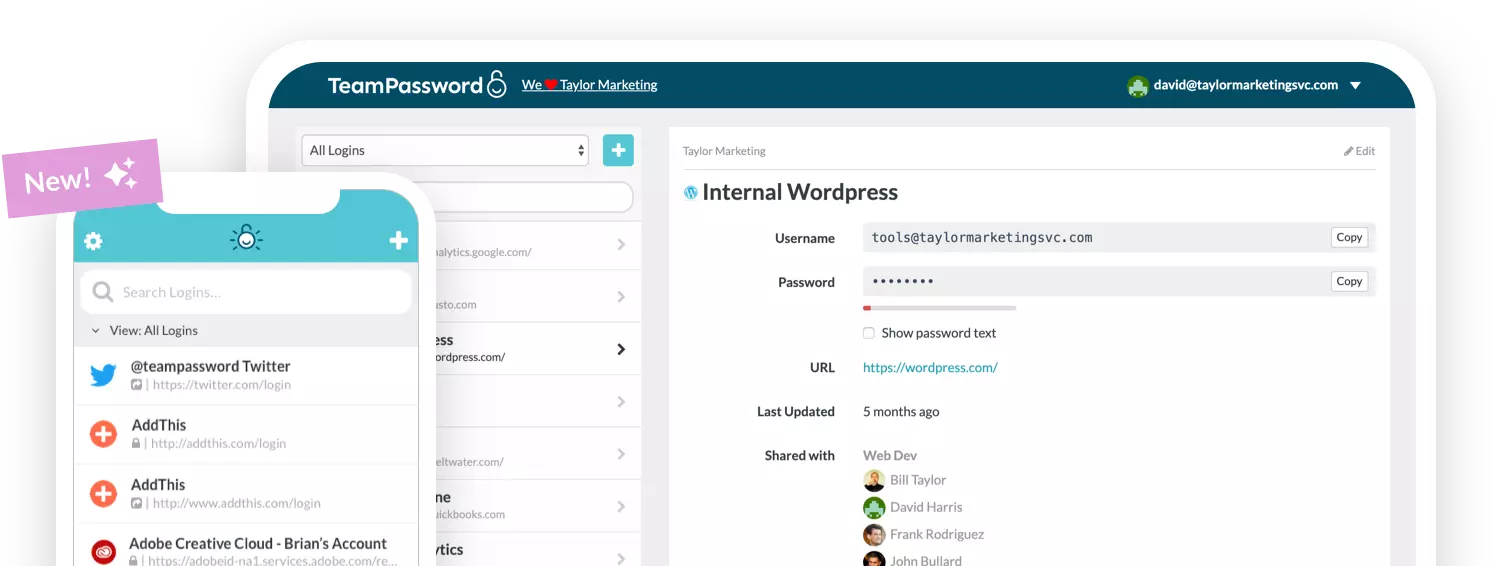
Facebook's breach history is a case study in why you can't outsource your security entirely to the platforms you use. What you can control is what happens to your other accounts when one platform leaks your credentials. That's where a password manager makes a concrete difference.
TeamPassword gives your team the tools to ensure a breach on one platform doesn't spread:
- Built-in password generator — Create strong, unique passwords for every account so credential stuffing can't move laterally across your services.
- Integrated TOTP Authenticator — Generate two-factor codes directly within TeamPassword, no separate app required.
- Enforceable 2FA — Require two-factor authentication for every user in your organization, not just those who opt in.
- Detailed Activity Logs — See exactly who accessed what and when, so any anomalous access is visible immediately.
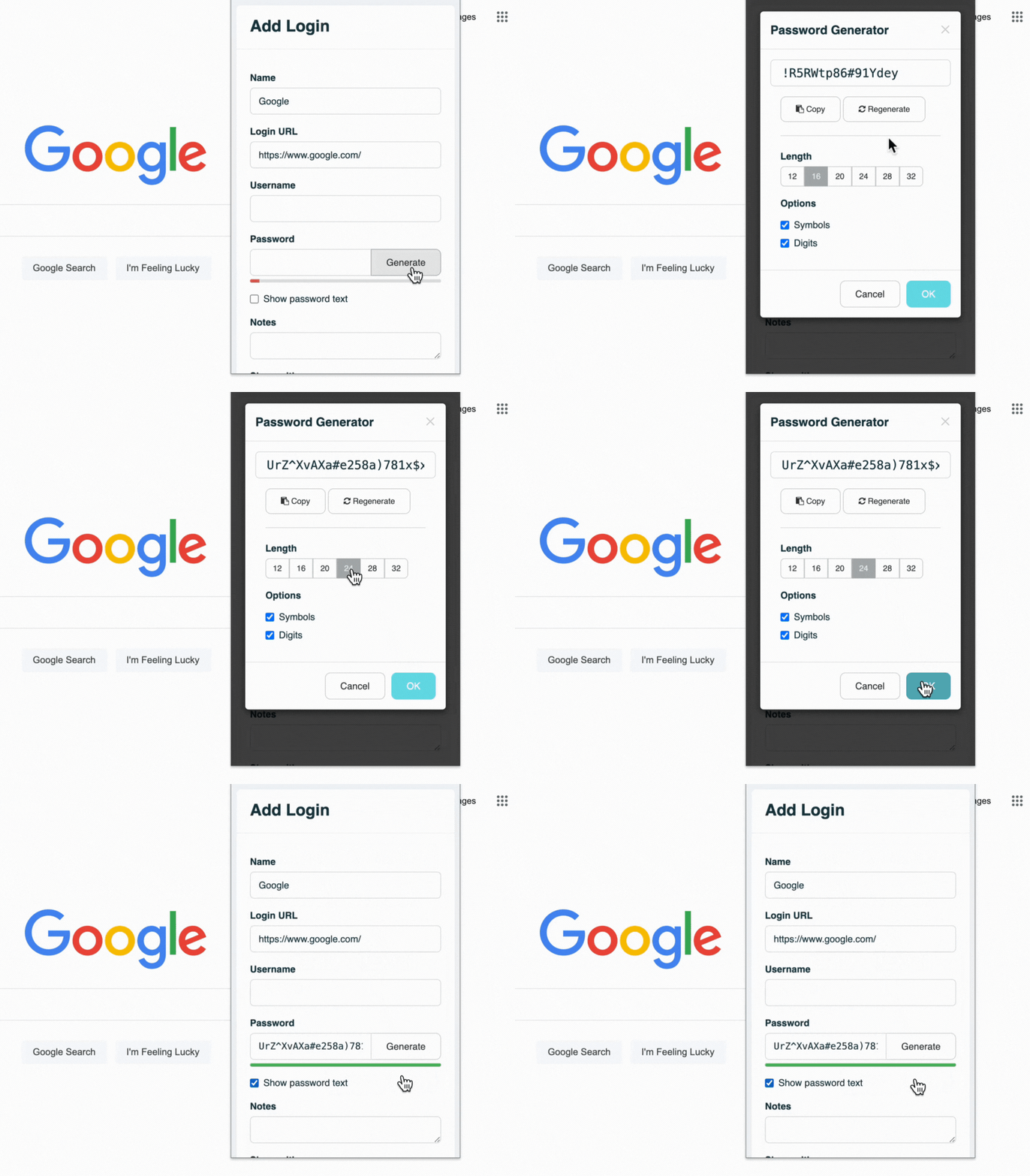
You can't make every account breach-proof. You can make sure a breach of one account doesn't become a breach of all of them. Plans start at just $1.41 per user per month.
Keep your team's credentials safe no matter what Facebook does next. Start your free 14-day trial →