
Nonprofits hold large amounts of sensitive data: donor financial records, beneficiary personal information, and grant details. Most operate with IT budgets that are a fraction of what a comparably sized business would spend on security. That combination makes nonprofits attractive targets. The threats are real, the stakes are high, and a surprising number of organizations find out the hard way.
This guide covers 12 of the most common cybersecurity threats nonprofits face, 28 specific prevention strategies, and an honest look at where to start if your organization has limited resources.
Why nonprofits are in the crosshairs
Attackers are rational. They go where the data is valuable and the defenses are weak. Nonprofits check both boxes. According to NTEN's State of Nonprofit Cybersecurity research, 56% of nonprofits don't enforce multi-factor authentication, 68% lack a documented policy for responding to a cyberattack, and more than 70% have never conducted a formal vulnerability assessment.
High staff and volunteer turnover compounds the problem. Every time someone leaves without their access being revoked, another door stays unlocked. And because many nonprofits rely on a mix of personal devices, shared accounts, and free-tier software, their attack surface is often broader than they realize.
Nonprofits that have been hit
These aren't hypothetical scenarios. Each of the following incidents happened to a real organization, and none required sophisticated technical skill to pull off.
Save the Children (2018)
A hacker gained access to a staff email account at Save the Children and used it to impersonate an employee. Fraudulent emails directed finance staff to redirect payments to a fake vendor account. By the time the fraud was discovered, $997,400 had been transferred. This is a textbook business email compromise attack: no malware, no hacking in the Hollywood sense. Just a convincing email and an absent verification process.
Blackbaud (2020)
Blackbaud is one of the most widely used nonprofit CRM and fundraising software platforms. In 2020, attackers gained access to their systems and deployed ransomware. Blackbaud paid the ransom, but donor data for more than 900 nonprofit clients, including hospitals, universities, food banks, and social service organizations, had already been exfiltrated. None of those nonprofits caused the breach. They were collateral damage from a single vendor's security failure. It remains the most significant third-party supply-chain incident in nonprofit history.
Utah Food Bank (2015)
Attackers compromised the Utah Food Bank's donation website during a fundraising campaign. Before the intrusion was detected, personal data for roughly 10,000 donors had been stolen. The organization had to notify donors, manage reputational fallout, and rebuild trust during what should have been a moment of community generosity.
The common thread: a convincing email, an unpatched vendor system, a vulnerable donation form. The defenses that would have stopped each of these incidents are well within reach of any nonprofit willing to prioritize them.
12 cybersecurity threats facing nonprofits
Nonprofits face a wide range of cybersecurity threats that can compromise donor data, disrupt operations, and damage organizational trust. Understanding the most common risks is essential for implementing effective protections.
Here are 12 threats every nonprofit should be aware of:
- Phishing (including spear-phishing)
- Ransomware
- Business email compromise (BEC)
- Credential stuffing
- Insider threats
- Third-party/vendor compromise
- Social engineering beyond email
- Website form and donation-page skimming
- IoT and smart-device compromise
- Data mismanagement and accidental exposure
- AI-enhanced attacks
- DDoS and website disruption
Phishing
Phishing is when attackers trick staff into revealing sensitive information or clicking malicious links, usually via email. Modern phishing comes in several varieties: smishing uses SMS, quishing embeds malicious URLs in QR codes, and spear-phishing delivers personalized, research-driven messages targeted at a specific person.
Nonprofits are frequent spear-phishing targets because attackers can research grant calendars, foundation relationships, and staff roles from public sources. An email that appears to come from a major foundation about a pending grant disbursement is much harder for a development officer to dismiss than a generic fraud attempt.
The human element, encompassing phishing, social engineering, and credential misuse combined, appears in the majority of data breaches, according to the Verizon 2026 Data Breach Investigations Report. Prevention: security training, email filtering, and enforcing 2FA/MFA.
Ransomware
Ransomware is malware that encrypts systems or data until a ransom is paid. For a nonprofit, that can mean losing access to donor databases, program records, and operational systems simultaneously, potentially during a fundraising campaign or a critical service period.
The financial impact is severe. According to Sophos's State of Ransomware 2025 report, the average ransom payment has reached $1.0 million, with total recovery costs averaging $1.5 million. Notably, exploited software vulnerabilities, not phishing, are now the leading root cause of ransomware infections. Keeping systems patched is no longer optional.
Prevention: offline backups, system patching, and limiting user privileges.
Business email compromise (BEC)
BEC occurs when attackers impersonate executives, board members, or major donors to redirect funds or extract sensitive information. Nonprofit finance staff are frequent targets, particularly around grant disbursements, capital campaigns, or wire transfers.
The scale is staggering: the FBI's Internet Crime Complaint Center logged 21,489 BEC complaints in 2023, representing $2.946 billion in reported losses, the second-costliest cybercrime category tracked by federal law enforcement. That figure covers only what was reported; the actual total is higher. Save the Children lost nearly $1 million to a single BEC incident in 2018.
Prevention: approval workflows for fund transfers, identity verification for sensitive requests, and domain monitoring for look-alike addresses.
Credential stuffing
Credential stuffing is when attackers take username and password combinations exposed in one breach and test them against other services. It works because password reuse is widespread: an estimated 85% of users reuse passwords across services. Even a 0.1% success rate yields thousands of compromised accounts when attackers are working from lists of millions of leaked credentials.
For nonprofits, a successful credential stuffing attack can expose donor records, grant management systems, or financial accounts, particularly when staff are reusing passwords from personal accounts breached elsewhere. IBM's 2025 Cost of a Data Breach Report identifies stolen credentials as one of the top five initial breach vectors, with such breaches taking an average of 186 days to detect.
Prevention: unique passwords generated by a password manager that eliminates reuse, and enforcing 2FA/MFA so credentials alone aren't sufficient for access.
Insider threats
Insider threats happen when staff or volunteers intentionally or accidentally misuse access to data or systems. Nonprofits face a particular challenge here: volunteer turnover is high, access controls are often informal, and the culture of trust that makes nonprofit teams effective can also make it harder to apply consistent security protocols.
An employee leaving for another organization, a disgruntled volunteer with administrative access, or a well-meaning staff member who accidentally emails a donor spreadsheet to the wrong recipient are all insider threat scenarios. Volunteer access is especially worth attention: accounts that aren't deactivated when someone stops volunteering remain active entry points indefinitely.
Prevention: regular access reviews, least-privilege policies, and activity logging.
Third-party/vendor compromise
Third-party compromise occurs when attackers breach a software vendor, payment processor, or partner organization to reach your data. The 2020 Blackbaud breach is the clearest nonprofit example: a single vendor's failure simultaneously exposed donor data for more than 900 organizations.
Nonprofits often rely on a patchwork of donated or discounted software tools, not all of which maintain the same security standards. Any system that connects to your donor database, payment processor, or email platform is a potential attack path, and you may not have any visibility into how well that vendor manages its own security.
Prevention: vet vendors' security practices before onboarding, apply least-privilege access to all integrations, and monitor third-party system activity for anomalies.
Social engineering beyond email
Social engineering beyond email involves attackers using phone calls, text messages, or in-person tactics to manipulate staff into granting access or revealing information. Attackers exploit the trust-first culture that characterizes most nonprofit environments; a caller claiming to be from your payment processor or a major donor's foundation can be surprisingly convincing.
This threat has grown with AI-generated voice synthesis, which can now convincingly mimic a known executive or donor's voice over the phone. What used to be a low-sophistication attack has become a high-sophistication one. Prevention: scam awareness training, strict identity verification for any sensitive request, and a clear policy that no access or fund transfer is approved based solely on a phone call or email.
Website form and donation-page skimming
Website skimming happens when malicious code is injected into online donation forms to capture payment card data as donors enter it. The Utah Food Bank attack exposed 10,000 donors through this method.
The attack has evolved significantly. Classic direct injection into checkout pages is less common now that major payment processors like Stripe and PayPal handle card data in isolated iframes. Modern skimming increasingly targets third-party JavaScript vendors, such as analytics tools, chat widgets, and tag managers loaded on thousands of sites. A single compromised JavaScript library can skim donor payment data across every nonprofit using that vendor simultaneously, with none of them aware their code has been altered.
Prevention: site integrity monitoring, PCI-compliant secure payment gateways, and regular audits of all third-party scripts loaded on donation pages.
IoT and smart-device compromise
Internet of Things (IoT) devices, including building access systems, security cameras, smart HVAC, and AV equipment, expand the attack surface of any organization. Most IoT devices ship with default credentials, receive infrequent firmware updates, and transmit data without encryption. An attacker who gains a foothold through a networked camera or a smart thermostat can use that access to probe the broader network.
The risk is not unique to nonprofits, but organizations with informal IT practices are more likely to have unmanaged devices on their networks. Prevention: isolate IoT devices on a separate network segment, apply firmware updates regularly, and disable any services or ports the devices don't actively use.
Data mismanagement and accidental exposure
This happens when sensitive donor or organizational data is mishandled: stored in unsecured spreadsheets, shared via personal email, uploaded to a cloud folder with public permissions, or retained long after it's needed. It's one of the most common and most underreported sources of nonprofit data exposure.
According to NTEN, 68% of nonprofits lack documented policies for responding to a cyberattack, and 38% have no cybersecurity policy at all. Without clear data handling policies, donor records get exposed through mistakes that have nothing to do with external attackers. Prevention: data encryption, documented retention policies, and ongoing staff training on data handling practices.
AI-enhanced attacks
Generative AI has materially changed what attackers can do with limited resources. The Verizon 2026 DBIR identifies 15 attack techniques now being enhanced by AI. For nonprofits, the most relevant developments are:
- AI-generated phishing emails that are grammatically perfect, contextually tailored, and indistinguishable from legitimate communications from foundations, government grant agencies, or partner organizations
- Deepfake audio and video used to impersonate executives over the phone or in video calls, authorizing wire transfers or credential sharing
- Automated credential-stuffing tools that use AI to rotate IP addresses and evade bot detection, dramatically increasing attack scale
Organizations can no longer rely on spotting “obvious” signs of fraud such as poor grammar, strange formatting, or generic greetings. Prevention: role-specific training on AI-assisted fraud, strict verification procedures for any financial request regardless of apparent source, and enforced MFA so compromised credentials alone aren't enough.
DDoS and website disruption
A distributed denial of service (DDoS) attack floods a website with traffic until it becomes unreachable. For most businesses, downtime is costly. For a nonprofit in the middle of a fundraising campaign or a matching gift deadline, a DDoS attack at the wrong moment can mean lost donations that simply don't come back.
Advocacy organizations face additional exposure: DDoS attacks are sometimes deployed for ideological reasons, targeting organizations whose work attracts adversarial attention. Prevention: DDoS protection through your hosting provider or CDN (Cloudflare and AWS Shield are common options), uptime monitoring with rapid alerting, and a contingency plan for directing donors to an alternate giving channel if your primary site goes down.
28 actions nonprofits can take to prevent cyber risks
Nonprofits can protect themselves from cyber threats by adopting a range of security measures and best practices. Implementing these strategies helps reduce risk, safeguard sensitive data, and maintain operational continuity.
Here are 28 prevention strategies every nonprofit should implement:
- Security training
- Email filtering
- Enforce 2FA/MFA
- Offline backups
- System patching
- Limit privileges
- Approval workflows
- Identity checks
- Password managers
- Vendor vetting
- Integration monitoring
- Site monitoring
- Network isolation
- Firmware updates
- Data encryption
- Scam awareness training
- Domain monitoring
- Strong passwords
- Access reviews
- User logging
- Least-privilege access
- Secure gateways
- Code integrity checks
- Disable services
- Retention policies
- Data handling training
- Incident response plan
- Cyber insurance
Security training
Security training teaches staff and volunteers how to recognize and respond to cyber threats, including phishing, social engineering, and suspicious link behavior. Given that the human element appears in the majority of data breaches, training is one of the highest-leverage investments a nonprofit can make, and one of the most affordable. CISA offers free training resources specifically designed for organizations without dedicated security teams. For teams with budget, phishing simulation exercises, which involve sending realistic fake phishing emails to staff and coaching those who click, are among the most effective training formats available.
Email filtering
Email filtering automatically scans and blocks suspicious or malicious messages before they reach employees. Email remains the primary entry point for phishing, malware, and BEC attacks. Most major email platforms (Google Workspace, Microsoft 365) include basic filtering; third-party tools like Proofpoint or Mimecast offer deeper inspection. Effective filtering helps prevent phishing, malware delivery, and business email compromise.
Enforce 2FA/MFA
Two-factor or multi-factor authentication adds a required second verification step beyond a password. Even if an attacker has a user's credentials, they can't access the account without also controlling the second factor. Yet 56% of nonprofits still don't enforce it. Enforcing MFA organization-wide, not just recommending it, is one of the single highest-impact steps available. For a practical rollout guide, see how to enforce 2FA across your organization. This helps prevent credential stuffing, account takeover, and unauthorized access.
Offline backups
Offline backups store critical data separately from the main network, on physical media or an air-gapped system, so ransomware can't reach them. A backup that's connected to the same network is not truly protected: attackers frequently seek out and encrypt connected backup drives before triggering ransomware payloads. Offline backups help prevent permanent data loss and minimize downtime during ransomware attacks or accidental deletions.
System patching
System patching involves updating software, operating systems, and applications to fix known security vulnerabilities. The Verizon 2026 DBIR found that exploited vulnerabilities now account for 31% of all breaches, surpassing stolen credentials as the top initial access vector. Attackers frequently target nonprofits running outdated software because the exploits are well-documented and require minimal skill to execute. Patching helps prevent ransomware, malware infections, and unauthorized network access.
Limit privileges
Limiting privileges means users have access only to the systems and data their role requires. A volunteer running a fundraising event doesn't need access to the full donor financial database. Excessive access amplifies the damage from mistakes, compromised accounts, and insider incidents. This helps prevent insider threats, data leaks, and ransomware propagation.
Approval workflows
Approval workflows require multiple people or verification steps before sensitive actions, particularly fund transfers, are completed. A BEC attack typically fails if there's a policy requiring a second person to verbally verify any wire transfer request, regardless of how official the email appears. Approval workflows help prevent business email compromise, financial fraud, and accidental data exposure.
Identity checks
Identity checks verify that a person requesting access or action is who they claim to be, through a callback to a known number, video verification, or a shared code established in advance. Given the rise of AI-generated voice and video impersonation, relying on caller ID or a familiar email address is no longer sufficient. Identity checks help prevent social engineering, unauthorized access, and deepfake-assisted fraud.
Password managers
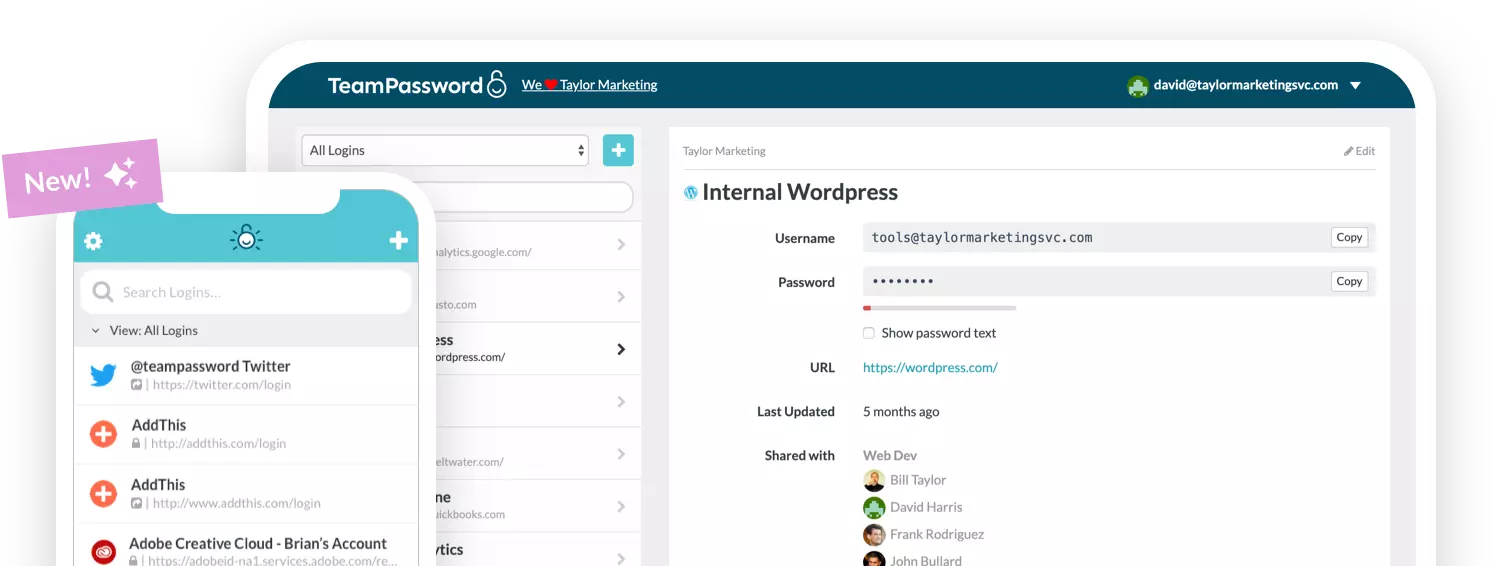
Password managers generate and store strong, unique passwords for every account, eliminating the password reuse that makes credential stuffing attacks so effective. For nonprofits with shared accounts, a common reality, a password manager also enables secure credential sharing without anyone needing to know or transmit the actual password.
Here are the best password managers for nonprofits.
Vendor vetting
Vendor vetting evaluates the security practices of third-party software partners before you connect them to your systems. After the Blackbaud breach, the argument for this is hard to ignore: a vendor's breach is your breach. At minimum, ask prospective vendors about their data encryption practices, incident response procedures, breach notification timelines, and whether they carry cyber liability insurance. Vendor vetting helps prevent third-party breaches, data leaks, and supply-chain attacks.
Integration monitoring
Integration monitoring tracks the activity of connected systems and applications for suspicious behavior, such as unexpected data exports, access at unusual hours, or new permissions being granted. Integrations are frequently overlooked because they're set up and forgotten. Monitoring helps prevent unauthorized access, data leaks, and malware propagation through connected platforms.
Site monitoring
Site monitoring checks your website and donation forms for malicious changes or injected code. Given the evolution of web skimming toward supply-chain attacks, effective monitoring needs to include scanning the behavior of external scripts loaded on your donation pages, not just your own code. Any external JavaScript library that changes unexpectedly warrants investigation. Site monitoring helps prevent form skimming, malware injections, and donor-facing reputational damage.
Network isolation
Network isolation separates sensitive systems, including donor databases, financial platforms, and administrative tools, from less secure parts of your network, including IoT devices and guest Wi-Fi. If an attacker gains a foothold through a compromised smart thermostat or a guest network device, isolation limits how far they can move from there. This helps prevent ransomware spread, malware infections, and unauthorized internal access.
Firmware updates
Firmware updates apply security patches to physical devices: routers, IP cameras, smart locks, AV equipment, and any other connected hardware. Most organizations stay on top of software updates but forget that the hardware running those systems also needs regular patches. Outdated firmware is one of the most commonly exploited vectors for network intrusion via IoT devices. Updates help prevent device compromise, network intrusion, and unauthorized access.
Data encryption
Data encryption converts sensitive information into an unreadable format for anyone without the decryption key. Encrypting donor data, financial records, and beneficiary information means that even if attackers successfully exfiltrate data, it's unusable to them. Encryption also reduces regulatory exposure under state data breach notification laws, which typically carry different thresholds for encrypted vs. unencrypted data. Encryption helps prevent data exposure, theft, and compliance violations.
Scam awareness training
Scam awareness training educates staff and volunteers on specific social engineering tactics: fraudulent emails, voice phishing (vishing), AI-generated impersonation, and in-person manipulation. As AI makes social engineering more convincing, this training needs to evolve beyond "look for bad grammar." The focus should be on process: no sensitive action based solely on a phone call or email, and always verify through a second channel using a number you sourced independently. This training helps prevent phishing, identity fraud, and financial scams.
Domain monitoring
Domain monitoring tracks your organization's registered domain for look-alike or typosquatted variations that attackers might register to impersonate your organization in phishing emails or fraudulent donation pages. If your domain is yourorg.org, attackers might register yourorg-donate.org or yourorg.com and use it to solicit fake donations or spoof internal communications. Monitoring helps prevent phishing, BEC, and donor-facing brand impersonation.
Strong passwords
Strong passwords are long, complex, and unique to each account. The easiest path is to let a password manager generate and store credentials automatically, removing the human temptation to reuse a memorable password across accounts.
Use TeamPassword's free password generator to create strong, unique passwords for every account.
Access reviews
Access reviews regularly evaluate who has permission to access which systems and data, and revoke anything that's no longer appropriate. In nonprofits with high volunteer turnover, accounts that aren't deactivated at offboarding remain active entry points indefinitely. A quarterly access review is a manageable cadence for most organizations. Understanding how to use activity logs to support access audits makes these reviews faster and more reliable. Access reviews help prevent insider threats, unauthorized access, and accidental data exposure.
User logging
User logging records who accessed what systems and when. Logs make it possible to detect suspicious behavior before damage occurs, reconstruct what happened after an incident, and demonstrate compliance to auditors or regulators. They're also a behavioral deterrent: people behave differently when they know access is recorded. User logging helps prevent insider misuse, unauthorized access, and data exfiltration.
Least-privilege access
Least-privilege access ensures each user, integration, and service account has only the permissions needed for its specific function, nothing more. This is the organizational implementation of "limit privileges" applied consistently across accounts, applications, and API connections. See the principle of least privilege for a deeper look at how to apply this systematically. This helps prevent ransomware spread, insider threats, and accidental data exposure.
Secure gateways
Secure gateways filter network traffic to block malicious content before it reaches users, covering web browsing, email, and application traffic. For nonprofits with staff working remotely or on personal devices, a secure web gateway also helps enforce consistent security policies regardless of location. Secure gateways help prevent ransomware, malware infections, and phishing attacks reaching end users.
Code integrity checks
Code integrity checks verify that your website's code and the third-party scripts it loads haven't been maliciously altered. Given the shift toward supply-chain skimming via JavaScript vendor compromise, it's no longer sufficient to audit only your own code. Subresource Integrity (SRI) hashes on third-party scripts are a practical technical control that flags unexpected script changes. Code integrity checks help prevent malware injection, data theft, and donation-form compromise.
Disable services
Disabling unused software services, network ports, and device features reduces the attack surface. A service that isn't running can't be exploited. On IoT devices especially, factory defaults often leave Telnet, FTP, and other legacy services active even when they're not needed. Disabling services helps prevent unauthorized access, malware propagation, and IoT-based intrusions.
Retention policies
Retention policies define how long sensitive data is kept and establish a schedule for secure deletion when it's no longer needed. Storing donor data, beneficiary records, and financial information indefinitely increases the potential damage of a breach and can create regulatory liability. A clear retention schedule also demonstrates responsible stewardship to donors. Retention policies help prevent data exposure, compliance violations, and privacy breaches.
Data handling training
Data handling training educates staff and volunteers on how to properly collect, store, share, and dispose of sensitive information. Many nonprofit data exposures are caused not by external attacks but by well-meaning staff who email a spreadsheet to the wrong person, upload donor records to an unsecured shared folder, or store sensitive information on personal devices. This training helps prevent accidental leaks, regulatory violations, and donor data compromise.
Incident response plan
An incident response plan is a documented playbook that defines who does what when a cyberattack or breach occurs. According to NTEN, 68% of nonprofits don't have one. When an incident happens without a plan in place, critical time is lost to confusion about roles, communication, and escalation; that delay directly determines how much damage gets done.
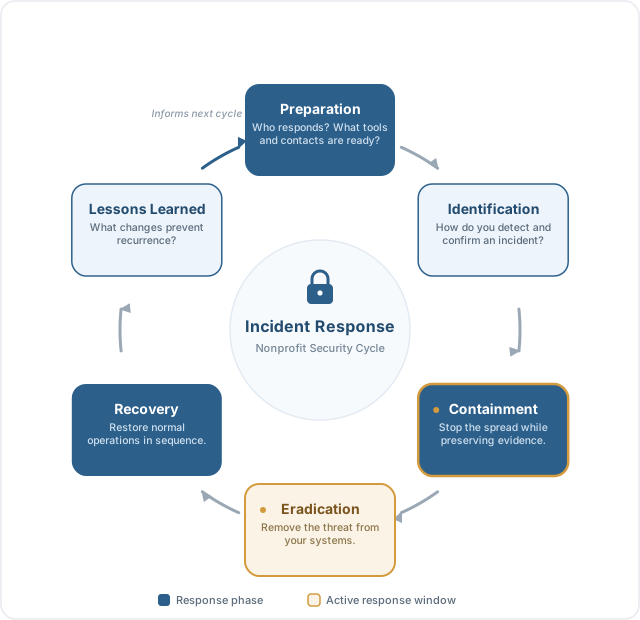
A basic nonprofit incident response plan should cover six phases:
- Preparation: Who is on the response team? What tools, vendor contacts, and legal counsel do you have ready?
- Identification: How do you detect and confirm an incident?
- Containment: How do you stop the attack from spreading while preserving evidence for investigation?
- Eradication: How do you remove the threat from your systems?
- Recovery: How do you restore normal operations, and what's the sequence?
- Lessons learned: What changes would prevent a similar incident?
CISA provides free incident response planning resources for nonprofits and small organizations. Even a one-page plan with key contacts and initial response steps is far better than nothing.
Cyber insurance
Cyber insurance provides a financial backstop for costs that can otherwise be catastrophic: breach notification expenses (legally required in most states), legal fees, ransomware negotiation and recovery, credit monitoring for affected donors, and business interruption losses. Basic policies for small nonprofits typically run $500 to $2,000 per year, a fraction of the $1.5 million average ransomware recovery cost.
When evaluating a policy, look at coverage limits, ransomware exclusions (some policies don't cover ransom payments), retroactive coverage for breaches discovered after the policy starts, and whether the insurer provides incident response assistance as part of the coverage. Cyber insurance doesn't replace good security practices, but it makes recovery far more likely when prevention falls short.
Nonprofit cybersecurity threats and actions to take
Here is a summary of the most common cybersecurity threats facing nonprofit organizations and how to prevent them. Ratings for specificity, sophistication, and likelihood reflect patterns reported across nonprofit sector breach data from the Verizon DBIR, IBM Cost of a Data Breach Report, and NTEN's State of Nonprofit Cybersecurity research.
| Threats 1–5 | Phishing | Ransomware | Business email compromise (BEC) | Credential stuffing | Insider threats |
|---|---|---|---|---|---|
| Description | Attackers trick staff into revealing information or granting access. | Malware locks systems and demands payment to restore access. | Attackers impersonate leaders to redirect payments or data. | Attackers test reused passwords from leaks to access accounts. | Staff or volunteers misuse access intentionally or accidentally. |
| Specificity to nonprofits | High | High | High | Medium | High |
| Stage of threat evolution | Established | Established | Evolving | Evolving | Established |
| Potential cost of risk | High | Extreme | High | High | Medium |
| Level of sophistication | Low to High* | High | Medium | Low | Medium |
| Likelihood of success | High | Medium | High | High | Medium |
| Primary attack vector | Human | Technical | Human | Technical | Mixed |
| Attacker motivation | Financial | Financial | Financial | Financial | Opportunistic |
| Detection difficulty | Medium | High | Medium | Low | Medium |
| Impact scope | Organization | Organization | Department | Organization | Department |
| Actions to take | Security training; email filtering; enforce 2FA/MFA | Offline backups; system patching; limit privileges | Approval workflows; identity checks; domain monitoring | Strong passwords; password managers; enforce 2FA/MFA | Access reviews; limit privileges; user logging |
*Phishing sophistication ranges from low (mass generic emails) to high (AI-generated spear-phishing personalized by role, name, and organizational relationships).
| Threats 6–10 | Third-party/vendor compromise | Social engineering beyond email | Website form and donation-page skimming | IoT and smart-device compromise | Data mismanagement and accidental exposure |
|---|---|---|---|---|---|
| Description | Attackers breach a partner to reach the nonprofit’s data. | Attackers use calls, messages, or in-person tactics to gain trust. | Malicious code steals donor payment data from online forms or third-party scripts. | Networked devices become entry points into core systems. | Poor handling or storage of donor or client data exposes records. |
| Specificity to nonprofits | Medium | High | Medium | Low | High |
| Stage of threat evolution | Evolving | Established | Evolving | Emerging | Established |
| Potential cost of risk | High | Medium | High | Medium | High |
| Level of sophistication | High | Low to High* | Medium | Medium | Low |
| Likelihood of success | Medium | High | Medium | Medium | High |
| Primary attack vector | Technical | Human | Technical | Technical | Mixed |
| Attacker motivation | Financial | Financial | Financial | Opportunistic | Opportunistic |
| Detection difficulty | High | Medium | High | Medium | Low |
| Impact scope | Organization | Department | Organization | Department | Organization |
| Actions to take | Vendor vetting; least-privilege access; integration monitoring | Scam awareness training; identity checks; security training | Secure gateways; code integrity checks; site monitoring | Network isolation; firmware updates; disable services | Data encryption; retention policies; data handling training |
*Social engineering sophistication ranges from low (generic impersonation calls) to high (AI-generated voice synthesis mimicking known executives or major donors).
| Threats 11–12 | AI-enhanced attacks | DDoS and website disruption |
|---|---|---|
| Description | Attackers use generative AI to craft more convincing phishing, deepfake impersonation, and automated credential attacks. | Attackers flood a website with traffic to take it offline, particularly damaging during fundraising campaigns. |
| Specificity to nonprofits | Medium | Medium |
| Stage of threat evolution | Rapidly evolving | Established |
| Potential cost of risk | High | Medium to High |
| Level of sophistication | Low to High | Low |
| Likelihood of success | High (increasing) | Medium |
| Primary attack vector | Human + Technical | Technical |
| Attacker motivation | Financial | Financial or Ideological |
| Detection difficulty | High | Low |
| Impact scope | Organization | Organization |
| Actions to take | AI-fraud awareness training; enforced MFA; strict verification for any financial request | DDoS protection via CDN/hosting provider; uptime monitoring; backup donation channel |
Related Reading: 5 Cybersecurity Mistakes Every Boss Should Be Aware Of In 2026
Where to start when your nonprofit has no dedicated IT budget
Twenty-eight strategies can feel overwhelming. Here's a prioritized starting point for organizations working with limited resources:
Free to implement today: Enable MFA on all accounts (your existing email and SaaS platforms almost certainly support it), set up a password manager, run security awareness training with free CISA resources, and enable email filtering in your existing platform.
Low cost ($0–$500/year): Offline backups via external drives or air-gapped storage, quarterly access reviews to deactivate lapsed accounts, a basic data retention policy, and a one-page incident response contact sheet.
Medium investment ($500–$2,000/year): Cyber insurance, a basic vulnerability assessment from a managed security provider (many offer nonprofit rates), and annual phishing simulation training.
The goal isn't perfect security; that doesn't exist. The goal is to raise the cost of attacking your organization above what most opportunistic attackers are willing to invest.
Frequently asked questions about nonprofit cybersecurity
Why are nonprofits targeted by cybercriminals?
Nonprofits hold large amounts of sensitive donor and beneficiary data, often process online donations, and typically operate with smaller IT budgets and fewer security staff than for-profit organizations of similar size. High staff and volunteer turnover also creates access management challenges. Attackers see nonprofits as high-value targets with lower defenses.
What is the most common cyber threat facing nonprofits?
Phishing is consistently the most common entry point. Attackers send emails impersonating major foundations, government agencies, or trusted partners to trick staff into revealing credentials or clicking malicious links. Business email compromise (BEC) is the most financially damaging form, generating $2.946 billion in reported losses in 2023 alone according to the FBI.
How can nonprofits protect themselves from cyberattacks?
The most impactful starting steps are: enforce MFA on all accounts, use a password manager to eliminate password reuse, train staff and volunteers to recognize phishing, maintain offline backups of critical data, and create a basic incident response plan. CISA offers free cybersecurity resources for nonprofits and small organizations.
What percentage of nonprofits have been hit by cyberattacks?
Exact figures vary by survey, but the readiness gap is well-documented: 56% of nonprofits don't enforce MFA, 68% lack a documented incident response policy, and more than 70% have never conducted a formal vulnerability assessment (NTEN). These gaps mean attacks frequently succeed before organizations realize they're under threat.
Do nonprofits need cyber insurance?
Yes. Cyber insurance covers breach notification expenses, legal fees, ransomware negotiation and recovery, and business interruption losses. Basic policies for small nonprofits typically run $500 to $2,000 per year. Given that the average ransomware recovery costs $1.5 million (Sophos, 2025), even a modest policy can mean the difference between recovery and permanent closure.
How much does a data breach cost a nonprofit?
IBM's 2025 Cost of a Data Breach Report puts the global average at $4.44 million per incident. Ransomware recovery averages $1.5 million in total costs. Nonprofits, which typically operate on tighter margins than enterprises, face proportionally devastating impacts. Save the Children lost nearly $1 million to a single BEC attack in 2018.
What cybersecurity frameworks should nonprofits use?
The NIST Cybersecurity Framework (CSF) and the CIS Controls are the two most widely used frameworks. The CIS Controls are particularly useful for resource-constrained organizations because they're prioritized: you implement the most impactful controls first. Both are free. CISA also publishes implementation guidance at cisa.gov.
How do you create an incident response plan for a nonprofit?
A basic plan identifies who does what when a breach occurs. It should cover six phases: preparation, identification, containment, eradication, recovery, and lessons learned. At minimum, document your response team, key vendor contacts, legal counsel, and the board member responsible for oversight. CISA's free incident response planning guide is a practical starting point.
What is spear-phishing and how is it different from regular phishing?
Phishing is mass-distribution; attackers send the same deceptive message to thousands of targets. Spear-phishing is targeted: attackers research a specific person's role, organization, and relationships, then craft a personalized message that's much harder to recognize as fraudulent. Nonprofits are frequently targeted with spear-phishing that impersonates major foundations or grant agencies.
Should a nonprofit pay a ransomware demand?
Most security experts and the FBI recommend against it. Payment doesn't guarantee data recovery, marks the organization as a willing payer, and may fund criminal networks. The better defense is maintaining current offline backups that let you restore systems without the attacker's key. If you're hit without backup options, consult a ransomware incident response firm before deciding.
How often should nonprofits conduct a cybersecurity risk assessment?
At minimum, annually, and also after major changes like adopting new software, onboarding a new vendor, or shifting to remote work. More than 70% of nonprofits have never conducted one. CISA offers free vulnerability scanning for eligible organizations, and many security firms offer reduced rates for nonprofits.
Are volunteers a cybersecurity risk for nonprofits?
Yes, for two reasons. Volunteers typically receive less security training than paid staff and may not follow the same protocols around passwords, phishing, and data handling. And high volunteer turnover creates access management problems: accounts that aren't deactivated after someone leaves remain open entry points. Applying the same access review and training standards to volunteers as employees significantly reduces this risk.
What was the Blackbaud data breach and why does it matter for nonprofits?
In 2020, Blackbaud, one of the most widely used nonprofit CRM platforms, was hit by ransomware. The breach exposed donor data for more than 900 nonprofit organizations, including universities, hospitals, and food banks, none of which caused the breach. It's the clearest demonstration of third-party vendor risk in the nonprofit sector: a single compromised vendor can simultaneously affect hundreds of organizations that trusted it.
Related Reading: Cybersecurity for Nonprofits: Keeping Your Nonprofit Secure
Protect your nonprofit's credentials with TeamPassword
A large share of the threats in this guide, including phishing, credential stuffing, BEC, and insider access misuse, trace back to weak, reused, or poorly managed passwords. TeamPassword gives nonprofit teams a practical way to close that gap: centralized credential management, enforced MFA, and a full audit trail, starting at just $2.41 per user per month.
- Enforceable 2FA — Mandate two-factor authentication for every user in your organization, so compromised credentials alone can't open the door.
- Integrated TOTP Authenticator — Generate time-based one-time passcodes directly in TeamPassword, without a separate authenticator app.
- Detailed Activity Logs — A full audit trail of who accessed which credentials and when, built for access reviews, incident investigations, and compliance reporting.
- Secure Credential Sharing — Share access to shared accounts without anyone needing to see or transmit the actual password.
Plans start at just $2.41 per user per month. Start your free 14-day trial →