
Cybersecurity is a vital issue for any organization, but nonprofits face unique risks. According to the 2026 Verizon Data Breach Investigations Report, 48% of all breaches now involve ransomware — the highest percentage ever recorded. At the same time, nonprofits typically operate with lean IT budgets, high volunteer turnover, and a heavy reliance on shared tools — a combination that makes them attractive targets.
This guide covers why nonprofits are specifically in attackers' crosshairs, the most common threats to know about, and ten concrete best practices you can implement today — including steps most organizations overlook entirely.
- Use Strong Passwords
- Enable Multi-Factor Authentication
- Watch Out for Phishing and Email Fraud
- Keep Software Updated
- Back Up Your Data
- Use a Password Manager
- Secure Your Fundraising Operations
- Control System Access
- Vet Your Third-Party Vendors
- Build a Security-Conscious Team
Key takeaways:
- Nonprofits are high-value targets: they hold sensitive donor and beneficiary data, often have limited security budgets, and handle significant financial flows through online platforms.
- Modern ransomware doesn't just lock your files — it steals donor data first, then threatens to publish it. Paying the ransom doesn't make the breach go away.
- Five of the most important cybersecurity controls for nonprofits are often completely absent: software patching, data backups, vendor vetting, an incident response plan, and cyber liability insurance.
- Password managers are one of the highest-ROI tools available — they shore up your biggest vulnerability and save hours of staff time.
Why Nonprofits Are Specifically Targeted
It's tempting to think cybercriminals focus on banks and large corporations. They do, but nonprofits are an increasingly attractive secondary target, for a few reasons that are specific to how nonprofits operate.
First, the data nonprofits hold is genuinely valuable. Donor databases contain names, addresses, email addresses, and often payment card data. Organizations serving vulnerable populations — immigrants, domestic violence survivors, people in addiction recovery — hold sensitive personal information that could cause real harm if exposed. Second, nonprofits raise and move significant amounts of money, making them targets for financial fraud. Third, and most importantly from an attacker's perspective, nonprofits are typically under-resourced on IT and security compared to for-profit organizations of comparable size.
The 2026 Verizon DBIR also found that 31% of breaches now start with unpatched software vulnerabilities, surpassing stolen credentials as the most common initial access vector for the first time. Attackers have automated the process of scanning for organizations running outdated software. A nonprofit that's months behind on updates is a much easier target than a well-patched enterprise with a dedicated security team.
Common Cybersecurity Threats for Nonprofits
Most nonprofits face a predictable set of threats. Understanding them is the first step to protecting against them.
- Data theft: Attackers access your systems — through hacking, phishing, or stolen credentials — and extract donor records, financial data, or beneficiary information. This data gets sold on the dark web, used for identity theft, or held for blackmail.
- Ransomware: Modern ransomware doesn't just encrypt your files and demand payment. In almost every major attack today, attackers steal your data first, then encrypt it — a tactic called double extortion. Even if you restore from backup, you may still face a threatened data leak. Ransomware can affect computers, servers, and cloud storage. According to the 2026 Verizon DBIR, nearly half of all breaches now involve ransomware.
- Business Email Compromise (BEC): An attacker impersonates your executive director, a board member, or a trusted vendor via a spoofed email address. They then request an urgent wire transfer, gift card purchase, or change to payment account details. BEC attacks cost nonprofits millions annually and are among the hardest to detect because they often involve no malware — just a convincing email.
- Phishing: Deceptive emails designed to trick staff into revealing credentials or clicking malicious links. Attackers are increasingly using AI to personalize these messages, making them far harder to spot than the typo-ridden scams of years past.
- Denial-of-service attacks: A flood of traffic makes your website or network unavailable — disrupting donation campaigns, event registrations, or beneficiary services.
- Website defacement: Attackers alter your website's content, often with offensive messages, to damage credibility and trust with your donors and community.
A data breach doesn't just mean lost data. It can mean regulatory fines, mandatory breach notifications (required in 47 US states within 30–60 days of discovery), loss of donor trust, and legal liability. If your organization serves vulnerable populations, a breach can jeopardize their safety directly. That's why it's worth investing in prevention now. Here's where to start.
10 Cybersecurity Best Practices for Nonprofits
Cybersecurity doesn't have to be overwhelming. These ten practices — most of which cost nothing or very little — cover the majority of the attack surface that nonprofit organizations face.
1. Use Strong Passwords (and Stop Using Weak Ones)
Passwords are still the front door to most of your accounts, and weak ones remain one of the most common ways attackers get in. A strong password has three properties: it's long, it's unique to each account, and it's random enough that it can't be guessed.
Current guidance from CISA and NIST SP 800-63B-4 (updated July 2025) recommends passwords of at least 16 characters — or better yet, a passphrase: four or more random words strung together. "correct-horse-battery-staple" is both easier to remember and more secure than a complex string of characters you'll forget and write on a sticky note.
What you shouldn't do: reuse the same password across accounts, use predictable substitutions (like @ for a, 3 for e), or base passwords on public information like your organization's name or founding year.
Practically speaking, the easiest way to maintain strong, unique passwords for every account is a password manager — which we'll cover below.
2. Enable Multi-Factor Authentication (MFA)
Multi-factor authentication means that even if someone steals your password, they still can't access your account without a second piece of verification. It's one of the most effective security controls available, and CISA calls FIDO-based MFA "the gold standard" for account protection.
Not all MFA is equal, though. Here's how the common methods rank from weakest to strongest:
| Method | How it works | Strength |
|---|---|---|
| SMS / text message code | A one-time code texted to your phone | Weakest — vulnerable to SIM-swapping. Use only as a last resort. |
| Email verification code | A one-time code sent to your email inbox | Weak — only as secure as your email account itself |
| Authenticator app (TOTP) | A rotating code from an app like Google Authenticator or Authy | Good — far harder to intercept than SMS |
| Push notification | A tap-to-approve prompt in an app like Microsoft Authenticator or Duo | Good — convenient and resistant to most attacks |
| Passkey / FIDO2 hardware key | A device-bound key (like a YubiKey) or synced passkey (built into Apple/Google/Microsoft) | Best — phishing-resistant; the only widely available MFA that defeats credential-phishing attacks |
Enable MFA on every account that supports it — email, your CRM, your fundraising platform, cloud storage, and your password manager. If your organization uses Google Workspace or Microsoft 365, you can enforce MFA for all users from the admin console.
If you're just getting started, an authenticator app like Google Authenticator or Authy is a significant upgrade over SMS and free to use. To set it up: download the app, go to the security settings of each account, select "authenticator app" or "TOTP," and scan the QR code.
3. Recognize and Respond to Email Threats
Email is the most common entry point for attacks on nonprofits. Two threat types deserve specific attention:
Phishing — deceptive emails designed to appear legitimate — are increasingly sophisticated. Modern phishing messages use AI to mimic writing styles, reference real colleagues by name, and create artificial urgency: "Your account will be locked unless you verify now." Before clicking any link or opening any attachment in an unexpected email, check the sender's full email address (not just the display name), hover over links to preview their actual destination, and verify unusual requests through a phone call or separate message — not a reply to the same email.
Business Email Compromise (BEC) is a more targeted form of fraud where an attacker impersonates a senior leader — your executive director, board chair, or finance manager — and requests an urgent wire transfer, gift card purchase, or update to a vendor's bank account. These emails often contain no malicious links or attachments, making them nearly invisible to spam filters. Your best defense is a simple policy: no financial transactions or changes to payment information based solely on an email request. Always verify by phone using a number you already have on file, not one provided in the email.
One more step that takes minutes and prevents email impersonation entirely: implement DMARC on your domain. DMARC is a free email authentication standard that prevents attackers from sending emails that appear to come from your organization's domain. The Global Cyber Alliance offers a free DMARC setup guide specifically for nonprofits.
4. Keep Software and Systems Updated
Unpatched software is now the most common way attackers gain initial access to organizations — responsible for 31% of all breaches in the 2026 Verizon DBIR. When a security vulnerability is discovered in widely used software, attackers automate tools to scan the internet for organizations still running the vulnerable version. Nonprofits, which often delay updates due to limited IT resources, are disproportionately exposed.
The fix is straightforward: enable automatic updates everywhere you can. This includes operating systems (Windows, macOS), browsers, email clients, website plugins (especially WordPress plugins, which are frequently exploited), and any software your staff uses for donor management, accounting, or communications. Schedule a monthly reminder to check for any updates that require manual action.
If your organization manages a website, keep the CMS and all plugins current. Outdated WordPress plugins are one of the most exploited attack vectors for nonprofit websites specifically.
5. Back Up Your Data Regularly
Backups are your last line of defense when everything else fails — and the thing that makes the difference between a ransomware attack being a crisis and a catastrophe. If an attacker encrypts your files and you have a clean, recent backup, you can restore your data without paying the ransom. Without a backup, you're either paying or starting from scratch.
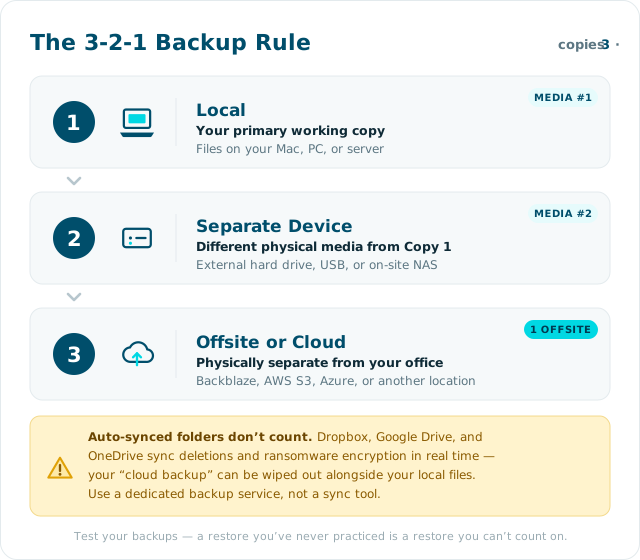
Follow the 3-2-1 backup rule: keep at least three copies of your data, on at least two different types of storage, with one copy stored offsite or in the cloud. Your local backup and your cloud backup should be separate — modern ransomware specifically targets cloud-synced folders like Dropbox and Google Drive, so a backup that syncs automatically can be encrypted right along with your live files.
Test your backups regularly. A backup you've never tried to restore from is not a backup you can count on.
6. Use a Password Manager
Most organizations have dozens or hundreds of shared accounts — donor databases, email platforms, social media, grant portals, and more. Managing those credentials securely without a password manager almost always leads to the same outcome: reused passwords, credentials shared over email or Slack, and no clear record of who has access to what.
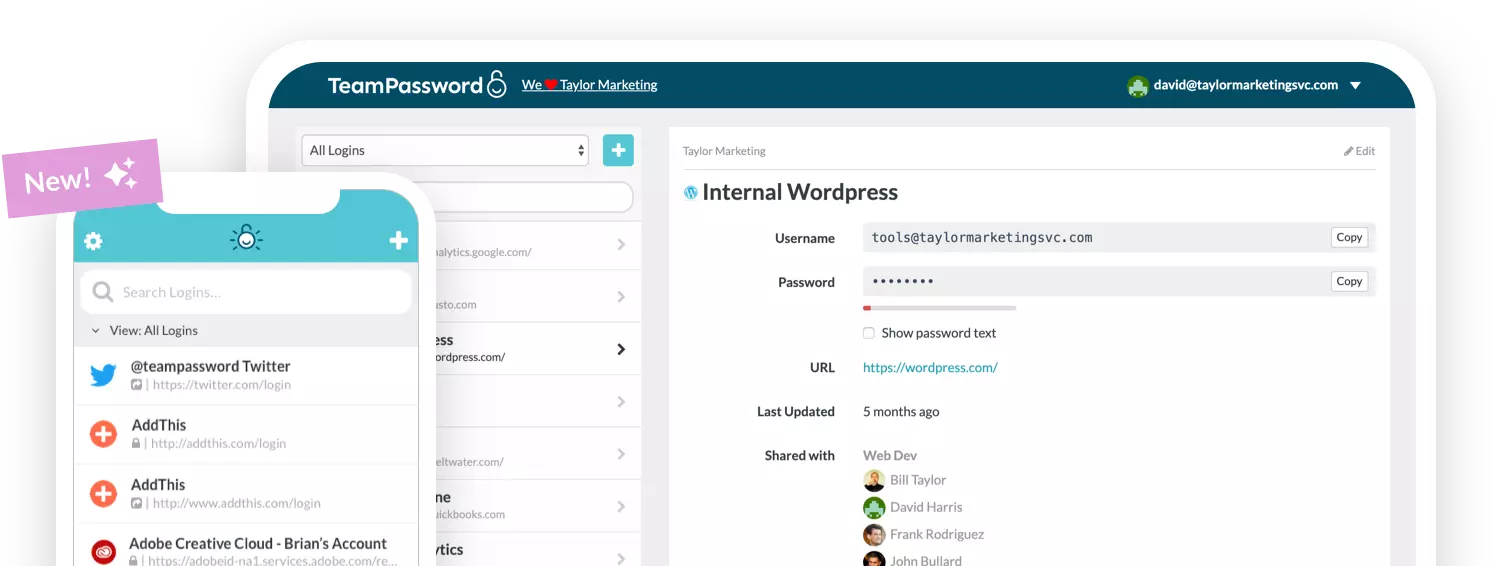
A password manager solves all of that. It stores credentials securely, generates strong unique passwords for every account, and lets you share access with team members without anyone ever seeing the actual password. When a staff member leaves, you revoke their access in one place — not by scrambling to remember every account they touched.
TeamPassword is a password manager designed specifically for teams. It lets you organize credentials into groups by team or project, enforce MFA across your whole organization, and autofill on any browser. Andrew M., VP of Operations at a nonprofit TeamPassword customer, puts it simply: "We use TeamPassword for our small non-profit and it's met our needs well."
7. Secure Your Fundraising Operations
Fundraising platforms are a particularly sensitive part of your infrastructure — they're directly connected to donor payment data and are regulated under PCI DSS (now on version 4.0.1) and, for organizations with EU donors, GDPR. US-based nonprofits should also be aware of applicable state privacy laws: California (CPRA), Virginia (CDPA), Colorado (CPA), and more than 20 other states now have comprehensive data privacy requirements that may affect your donor data handling.
When evaluating fundraising software, ask vendors specifically about:
- Encryption: Is data encrypted in transit (TLS) and at rest? What encryption standard do they use?
- Compliance: Are they PCI DSS compliant? Do they have a SOC 2 Type II certification?
- Access logs: Can you see a history of who accessed donor records and when?
- Breach notification: What's their process if they experience a breach affecting your data?
- Data portability: Can you export your data if you switch platforms?
For health-related nonprofits — clinics, social service organizations, hospices — HIPAA compliance is an additional requirement for any vendor handling protected health information.
8. Control Who Has Access to What
The principle of least privilege is simple: people should only have access to the systems and data they actually need to do their job. A program coordinator doesn't need access to your donor financial records. A volunteer shouldn't have admin rights to your CRM.
In practice, this means doing a quarterly access review — going through your key systems and verifying that everyone who has access still needs it, at the level they have it. When a staff member or volunteer leaves, revoke their access within 24 hours across every platform: email, cloud storage, your CRM, your fundraising platform, and any shared password vaults. High-turnover environments like nonprofits often accumulate ghost accounts — former staff who technically still have login credentials months after they left.
Single sign-on (SSO) makes this dramatically easier. If all your systems authenticate through one identity provider (Google Workspace or Microsoft 365, for example), deactivating one account cuts access everywhere simultaneously.
- Conduct a quarterly access review across all key systems
- Revoke departing staff and volunteer access within 24 hours
- Implement SSO where possible to centralize access control
- Use a password manager to handle credentials for systems that don't support SSO
9. Vet Your Third-Party Vendors
Your cybersecurity is only as strong as the vendors you rely on. Your outsourced bookkeeper, cloud storage provider, donation processor, and email marketing platform all have access to your data — and a breach at any of them can become a breach for you.
Before signing with any vendor that will touch sensitive data, ask: Do they have a SOC 2 Type II report? What's their breach notification process? Do they subcontract any of their data processing, and to whom? What happens to your data if you end the relationship?
Establish a simple written policy for vendor due diligence — even a one-page checklist — so that evaluating security isn't left to individual judgment each time. Review your existing vendor relationships annually and remove access for any vendors you're no longer actively using.
10. Build a Security-Conscious Team
Technology can only take you so far. Human behavior is the final variable in your security posture, and it's the one attackers exploit most effectively. Your staff and volunteers interact with your systems daily; they are either your best defense or your most exploitable vulnerability.
Building a security culture doesn't require a dedicated IT team. It requires consistent, accessible training — and an environment where people feel comfortable reporting suspicious activity without fear of blame.
- Run simulated phishing exercises a few times a year — not to catch people out, but to build real-world muscle memory
- Send brief security newsletters or tips after major incidents in the news (they make the stakes feel real)
- Create a clear, written policy on how to handle suspicious emails, data requests, and security incidents
- Make it easy to report: a single email address or Slack channel where staff can flag anything that looks off
Wizer Training is a strong option for structured security awareness training — it serves 20,000+ organizations, offers a free tier that works well for smaller nonprofits, and has added modules specifically covering AI-generated phishing and deepfake threats. CISA also offers free phishing simulation and training resources at cisa.gov.
Create an Incident Response Plan
Every best practice above is about prevention. But no security posture is perfect, and the organizations that recover fastest from attacks are the ones that planned for them in advance.
An incident response plan (IRP) doesn't need to be a 50-page document. At minimum, it should answer four questions:
- Who do we call? Name specific people: your internal point of contact, your IT support provider or MSP, your legal counsel, and — if you have it — your cyber insurance carrier's breach hotline. Have their phone numbers written down somewhere that doesn't require internet access.
- How do we contain it? Know the steps to isolate an affected device (disconnect from the network, don't turn it off), and who has the authority to take systems offline if needed.
- Who do we notify, and when? Most US states require breach notification within 30–60 days of discovery. If you handle health data, HIPAA has its own notification timeline. Identify your regulatory obligations before you're in a crisis.
- How do we recover? Know where your backups are, how to restore from them, and who's responsible for communicating with donors and the public.
Test the plan at least once a year with a tabletop exercise — walk your leadership team through a simulated scenario. Community IT Innovators offers a free guide to creating a nonprofit incident response plan that's a good starting point.
Consider Cyber Liability Insurance
Cyber liability insurance covers costs that security controls can't — legal fees, breach notification expenses, forensic investigation, public relations support, and sometimes ransom payments. For nonprofits, a single breach incident can easily run into the tens of thousands of dollars in recovery costs, even without any ransom payment involved.
Cyber insurance isn't just for large organizations. Many insurers now offer policies specifically sized for small nonprofits, and many foundation funders and grant-makers increasingly expect it as part of organizational risk management. If your organization handles payment card data or health information, it's worth getting a quote.
Before purchasing, make sure you understand what triggers coverage, what's excluded, and whether your existing general liability policy has a cyber exclusion (many do). Your current insurer is a good first call; brokers who specialize in nonprofit coverage can also help you compare options.
Free Cybersecurity Resources for Nonprofits
Budget constraints are real. The good news is that some of the most effective cybersecurity tools and resources are available at no cost, with nonprofits specifically in mind.
- CISA (Cybersecurity and Infrastructure Security Agency): Free vulnerability scanning, phishing simulation tools, and training resources at cisa.gov. CISA also publishes free guides on MFA, strong passwords, and incident response.
- Global Cyber Alliance Nonprofit Toolkit: A curated set of free tools including DMARC setup, DNS filtering via Quad9, and security assessment resources at globalcyberalliance.org.
- TechSoup: Deeply discounted or donated security software (Norton, Avast, Bitdefender, and more) for nonprofits at techsoup.org.
- Microsoft Nonprofit Program: Eligible nonprofits get Microsoft 365 Business Premium — which includes enterprise-grade security features — at significantly reduced or no cost. Details at microsoft.com/nonprofits.
- Wizer Training (free tier): Security awareness training for unlimited staff at no cost, with paid tiers for advanced features like phishing simulation at wizer-training.com.
How TeamPassword Can Help You Secure Your Nonprofit
TeamPassword is built for teams that share credentials — which describes nearly every nonprofit. It handles the password problem end-to-end: generating strong passwords, storing them securely, sharing them with the right people, and making sure former staff can't take access with them when they leave.
- Security: Industry-standard encryption, enforceable 2FA, SSO, activity logs, and admin permission controls.
- Simplicity: Create groups for different teams or projects, add users with a few clicks, import passwords from other sources. Most teams are fully set up within an hour.
- Integration: Browser extensions for all major browsers and mobile apps mean your team can access credentials from anywhere without copy-pasting.
- Nonprofit pricing: Discounted pricing for nonprofits, with live support Monday through Friday via email or chat.
If you want to see how TeamPassword works, sign up for a free trial — no credit card required.
Sources
- Verizon 2026 Data Breach Investigations Report
- CISA — Use Strong Passwords
- CISA — Multi-Factor Authentication
- NIST SP 800-63B-4 Digital Identity Guidelines (July 2025)
- PCI DSS v4.0.1 — PCI Security Standards Council
- Global Cyber Alliance — Nonprofit Cyber Toolkit
- Community IT Innovators — Nonprofit Incident Response Plan Guide