Last updated: June 2026. Originally published January 19, 2023.
According to the 2026 Verizon Data Breach Investigations Report, 31% of breaches now start with software vulnerabilities — and 48% involve ransomware. IBM's 2025 Cost of a Data Breach Report puts the global average breach cost at $4.4 million. These aren't edge cases. They're the baseline.
If you manage a team, your employees are on the front lines of your organization's security posture every day — clicking links, opening attachments, logging in from coffee shops. The good news is that most successful attacks exploit a small set of well-known mistakes. Fix those, and you dramatically reduce your exposure.
Here are the six cybersecurity mistakes managers most commonly make — and exactly what to do about each one.
TL;DR — The 6 Mistakes at a Glance
- Skipping employee training — people are still the easiest attack surface
- Running end-of-life software — Windows 10 lost security patches in October 2025
- Weak or reused passwords — credential stuffing is cheap and automated
- Unencrypted cloud storage — standard encryption isn't the same as zero-knowledge encryption
- No breach detection setup — you can't respond to what you can't see
- No backup and recovery plan — the only real defense against ransomware
1. Failing to Train Employees on Cybersecurity
Security awareness training isn't a one-time checkbox. It's an ongoing program — and the difference between a team that catches phishing emails and one that clicks them.
Effective training covers current attack techniques: how phishing works, how ransomware spreads, what social engineering looks like, and — increasingly — how AI is changing the threat landscape. Generative AI is now being used to write highly convincing phishing emails, impersonate executives in voice calls, and craft fake invoices that pass a casual read. The 2026 Verizon DBIR identifies 15 distinct attack techniques now augmented by AI. Your employees need to know this is what they're up against.
If you find that topic overwhelming, start with a brief introductory video such as this one: https://www.youtube.com/watch?v=wBgWJFVt2RI
A practical training program looks like this:
- Quarterly training sessions — a 20-minute video plus a short quiz. Platforms like KnowBe4, Proofpoint Security Awareness, or free resources from CISA make this straightforward to run.
- Monthly phishing simulations — send fake phishing emails to your team and track who clicks. This is not about gotcha discipline; it's about identifying who needs more support and which types of lures are fooling people.
- A clear incident response protocol — every employee should know exactly who to call and what to do if they click something suspicious. "Tell IT immediately" needs to be a reflex, not a decision.
Training alone won't stop every attack. But it raises the floor significantly, and that's where most breaches start.
2. Using Outdated Hardware and Not Updating Software
Running software past its end-of-life date is one of the fastest ways to give attackers an open door. When a vendor stops releasing security patches, every new vulnerability discovered in that software stays open — permanently. Attackers know this, and they actively scan for unpatched systems.
This used to be illustrated with Windows 7, which reached end-of-support in January 2020. But as of October 14, 2025, Windows 10 reached end-of-support — a far more urgent concern right now. Businesses still running Windows 10 machines without upgrading to Windows 11 are in the same exposed position. Microsoft's support lifecycle page is worth bookmarking to track EOL dates for your software stack.
For most managers, the practical steps are:
- Run a software audit. Use built-in OS tools (Windows Update, System Information) or a free tool like Belarc Advisor to inventory what's installed and flag anything out-of-date.
- Assign someone responsibility for patching. Patch Tuesday (the second Tuesday of each month, when Microsoft releases security updates) is a useful anchor. Set a calendar reminder and make it someone's job.
- Track EOL dates. Keep a simple spreadsheet of critical software with vendor EOL dates. When something approaches end-of-support, start the upgrade process 90 days out — not the day after.
If replacing every machine isn't feasible right now, prioritize the machines that handle sensitive data or have access to core business systems. Not all risk is equal.
3. Not Using Strong, Unique Passwords
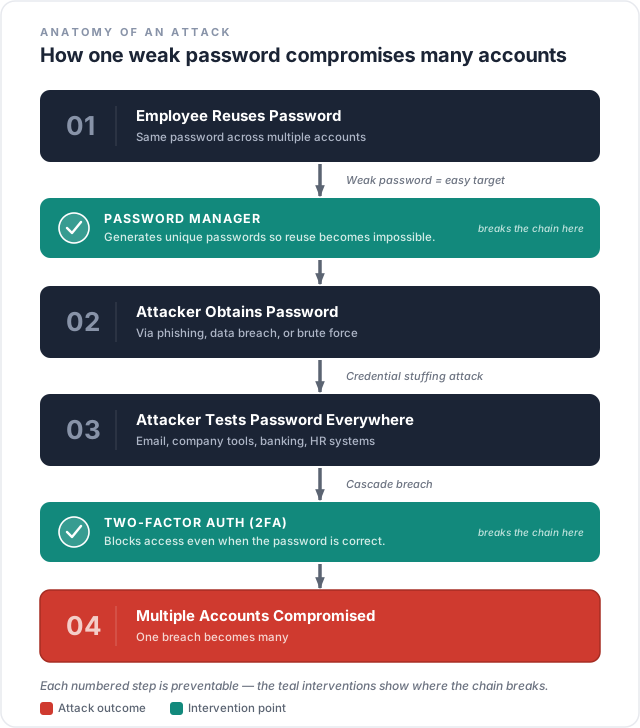
Password-based account compromise remains one of the most common attack vectors — not because people use weak passwords (though they do), but because credential stuffing is now completely automated. Attackers take lists of username/password combinations leaked from other breaches and try them at scale against every major platform. If one of your employees reuses a password from a personal account that was compromised in an unrelated breach, attackers can get into your business systems within minutes.
The old advice about changing passwords regularly has been retired. NIST SP 800-63B — the authoritative guidance on digital identity — specifically discourages forced periodic password resets, because they lead to predictable, incremental changes ("Spring2024!" becomes "Summer2024!"). The current standard is: unique, randomly generated passwords for every account, stored in a password manager, with multi-factor authentication (MFA) enabled.
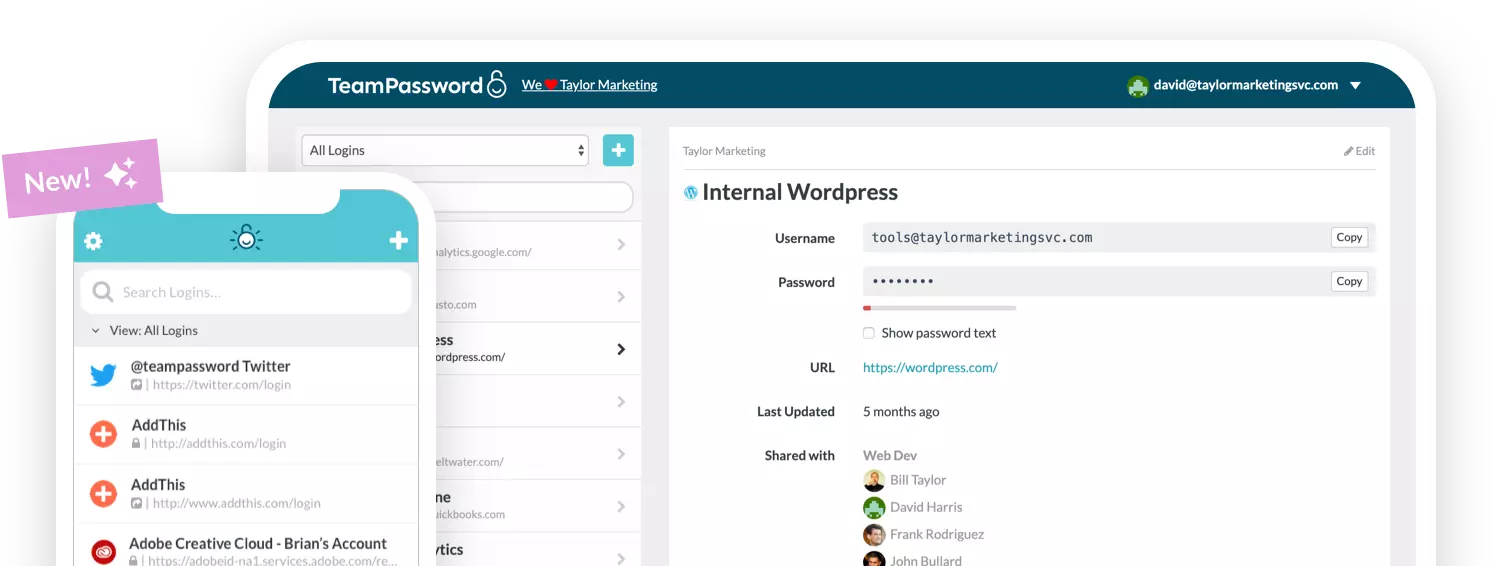
Use a password generator to create fully random passwords. A team password manager like TeamPassword, 1Password, or Bitwarden makes it practical for employees to actually use unique passwords everywhere — because they don't need to remember any of them.
On MFA: any MFA is better than no MFA, but not all MFA is equal. SMS-based one-time codes are vulnerable to SIM-swapping and real-time phishing attacks. The current gold standard is phishing-resistant MFA — specifically, passkeys or FIDO2 hardware security keys (like a YubiKey). These are immune to phishing because authentication is tied to the specific site's domain. The NCSC's guidance on passkeys is a good starting point if this is new territory.
For teams managing shared account credentials, a dedicated team password manager is essential — it lets you grant and revoke access cleanly without ever sharing the actual password.
4. Storing Sensitive Data in the Cloud Without Understanding Encryption
Most major cloud providers — Google Workspace, Microsoft 365, Dropbox, AWS — encrypt data at rest and in transit as a baseline. That's good, but it's not the full picture: in these cases, the provider holds the encryption keys. If a provider is legally compelled to disclose your data, or suffers a breach of its own key management systems, your data is accessible.
For highly sensitive business data — legal documents, financial records, health information, proprietary IP — the higher standard is zero-knowledge or end-to-end encryption, where only you hold the keys. The provider literally cannot read your files. This distinction matters and is worth understanding before you decide where to store sensitive material.
What to do:
- Check whether your existing cloud provider offers client-side encryption or zero-knowledge options. Many enterprise tiers of Google Workspace and Microsoft 365 now offer client-side encryption for specific workloads.
- For files that need the highest protection, use a dedicated encrypted storage solution where zero-knowledge encryption is the default — and verify that claim in the provider's technical documentation, not just marketing copy.
- At minimum, ensure MFA is enabled on all cloud accounts. A stolen password shouldn't be enough to access your cloud storage. A compromised account with MFA enabled is far harder to exploit.
A data breach doesn't need to be dramatic to be expensive. The average cost is $4.4 million — and that's before you factor in regulatory fines, customer churn, or legal exposure.
5. Having No Processes for Detecting Breaches and Incidents
You can't respond to a breach you don't know is happening. And attackers frequently count on exactly that: the average time between initial compromise and detection has historically been measured in weeks, not hours. Every day inside your network undetected is another day of data exfiltration, lateral movement, or ransomware staging.
The tools for detecting anomalies are no longer just for enterprises. Here's a practical progression by company size:
- Starting point (any size): Enable sign-in logs and anomaly alerts in Microsoft 365 or Google Workspace. Both platforms have built-in security dashboards that flag unusual login locations, impossible travel events, and suspicious forwarding rules. Turn these on and review them weekly.
- Next step: Implement a SIEM (Security Information and Event Management) system. Wazuh is open-source and free. Microsoft Sentinel has a free tier. These aggregate logs from across your systems and generate alerts when patterns match known attack signatures.
- For businesses that need managed coverage: Consider an MDR (Managed Detection and Response) service — a 24/7 monitoring service that investigates alerts on your behalf. These range from a few hundred to a few thousand dollars per month depending on size.
Equally important: write down what happens when something is detected. An incident response (IR) plan doesn't need to be 40 pages. It needs to answer: who gets called, in what order, and what decisions do they make? CISA offers free IR plan templates designed for small and mid-sized organizations. Fill one out before you need it.
6. Failing to Back Up Data and Test Restores
This is the mistake that turns a bad day into a catastrophic one. Ransomware, which now accounts for 48% of breaches according to the 2026 Verizon DBIR, works by encrypting your files and demanding payment for the decryption key. The only reliable defense — the one that lets you tell the attacker to get lost — is a clean, tested backup you can restore from.
The standard framework is the 3-2-1 rule:
- 3 copies of your data
- 2 different storage media (e.g., a local NAS drive and a cloud backup)
- 1 offsite copy (either cloud or a physical drive kept off-premises)
The part most businesses skip is testing. A backup you've never restored from is a backup you can't trust. Run restore drills quarterly. Pick a random file or folder, restore it from backup, and verify it's intact. This takes 20 minutes and ensures you're not discovering a broken backup chain during an actual incident.
Cloud-based backup services like Backblaze Business Backup, Acronis Cyber Protect, or Veeam make automated, offsite backup straightforward for businesses of any size. Many integrate with Microsoft 365 and Google Workspace specifically, since those platforms' native version history is not a substitute for a true backup.
Managing Employees While Protecting Your Company Online
The goal isn't a culture of fear — it's a culture of awareness. Employees who understand the stakes are assets, not liabilities. They spot phishing emails, ask questions before clicking strange links, and know who to call when something looks wrong.
Give them the right tools. Password managers are one of the most effective per-dollar investments in organizational security — they solve the password reuse problem at scale without relying on anyone's memory. Antivirus software, a password strength checker, and browser extensions that warn against known phishing sites are all low-cost additions that meaningfully reduce risk.
Start with the checklist below. These are the actions that move the needle the most, in roughly the order you should tackle them.
What to Do This Week
- Enable MFA on every business account today — email, cloud storage, banking, payroll. Start with phishing-resistant options (passkeys, hardware keys) where available; any MFA beats none.
- Audit your software for end-of-life status — specifically check for any machines running Windows 10. Upgrade or isolate them.
- Deploy a team password manager — evaluate TeamPassword, 1Password Teams, or Bitwarden Business. Most have free trials. Roll out with a policy requiring unique passwords and prohibiting password reuse.
- Verify your cloud backup exists and is working — pick one file, restore it, confirm it's intact. If you don't have a cloud backup, set one up this week.
- Turn on sign-in anomaly alerts in Microsoft 365 or Google Workspace Admin Console. This takes about 15 minutes and gives you immediate visibility into suspicious logins.
- Schedule quarterly cybersecurity training — book the next session now, before it falls off the calendar. Include a simulated phishing test.
- Write a one-page incident response plan — who to call, in what order, when something goes wrong. Keep it somewhere everyone can find it.
Frequently Asked Questions
What are the most common cybersecurity mistakes small businesses make?
The most common are skipping employee training, running software past its end-of-life date, allowing password reuse, storing sensitive data without understanding encryption, having no breach detection, and having no tested backup plan. Each of these is individually fixable with a modest time investment.
How often should employees receive cybersecurity training?
Quarterly training sessions paired with monthly simulated phishing tests is the current best-practice standard. One annual training session is better than nothing, but it's not enough to build durable habits or keep pace with evolving threat tactics.
What is the cheapest way to improve cybersecurity for a small business?
Enable MFA everywhere, deploy a password manager, and turn on the built-in security monitoring in Microsoft 365 or Google Workspace. These three steps cost little to nothing beyond time and address the most common attack vectors. CISA also provides free training resources and IR plan templates at cisa.gov/cybersecurity.
What should I do if my company has a data breach?
Execute your incident response plan. If you don't have one, the immediate priorities are: contain the breach (take affected systems offline or revoke compromised credentials), assess what data was accessed, notify affected parties as required by law, and bring in outside help if you don't have internal security expertise. CISA's free resources include response guidance for small organizations.
Is MFA really enough to prevent account compromise?
Standard MFA (SMS codes, authenticator apps) significantly reduces risk but isn't impenetrable — SIM-swapping and real-time phishing can bypass it. Phishing-resistant MFA, specifically passkeys and FIDO2 hardware keys, is the current gold standard and is immune to most phishing attacks. Enable whatever MFA you can now, then upgrade to phishing-resistant options as you're able.